For nursing home DONs who need staffing numbers they can explain and records they can stand behind.
Your staffing team covered the shifts. But can your facility prove the hours it reports to CMS?
A schedule says who should have worked. A timesheet says who signed off. PBJ needs the eligible hours people actually worked. When those records disagree, your team must find the error and explain it.
Medicare and Medicaid-certified nursing homes report staffing hours every quarter through the Payroll-Based Journal (PBJ).
The report includes eligible hours from employees, agency clinicians, and contract staff. Hospitals and assisted living communities generally do not file PBJ unless they operate a certified nursing home.
Who asks about those numbers? The nursing home administrator may ask the DON to explain nursing coverage or agency shifts.
Payroll, HR, or the PBJ coordinator may need help resolving a mismatch. During a certification survey, state surveyors may ask about staffing practices and records.
The DON can explain what happened on the floor, while the designated PBJ team handles preparing and submitting the report. Exact responsibilities depend on the facility.
The goal is not just to submit PBJ on time.
Reliable staffing records help nursing leaders explain coverage, finance teams reconcile labor costs, and administrators demonstrate performance when questions arise.
What Matters Most
- PBJ starts with actual, eligible hours worked, not just scheduled shifts.
- Missing or incorrect data can affect staffing ratings and trigger questions during surveys.
- Review agency hours, meal breaks, training time, overnight shifts, and weekend coverage before submission.
Why DONs Need Visibility Into PBJ Records
CMS uses PBJ data to calculate six staffing measures on Care Compare, including staffing levels and turnover. A reporting mistake can make a facility’s published staffing picture less accurate.
See the CMS Five-Star Quality Rating System User Guide.
PBJ data can prompt state surveyors to examine reported RN coverage gaps or low weekend hours.
They may ask the DON about the staffing plan, who covered the shifts, and how the facility checked its records.
The administrator and reporting team may also need that information to resolve discrepancies. A flagged PBJ figure is a reason to investigate, not proof that a shift went uncovered.
For Medicare or Medicaid certification, nursing homes must meet applicable requirements in 42 CFR Part 483, Subpart B.
State surveys assess compliance. Certification surveys and the Five-Star staffing rating serve different purposes, but both make accurate staffing records important.
Why Accurate PBJ Records Matter Beyond Compliance
PBJ reporting is often treated as a compliance task. But the records behind it affect three things nursing home leaders deal with every day: staffing coverage, labor costs, and performance.
Reliable attendance records help the DON see whether shifts were actually covered.
They give payroll and finance a way to compare approved hours with agency invoices. And they help the administrator answer staffing questions without having everyone reconstruct what happened weeks ago.
Those same records also feed CMS staffing measures. For eligible skilled nursing facilities, total nurse staffing hours and nursing staff turnover are part of the SNF Value-Based Purchasing Program, which can affect Medicare payment adjustments.
FY 2027 payment calculations use earlier performance data, not PBJ submissions made in 2027. See the CMS SNF VBP guidance.
Good PBJ data won’t fix a staffing shortage or automatically lower costs, improve ratings, or increase payments.
What it does is give leaders a clearer picture of staffing and a better chance to catch problems before they grow.
Where PBJ Reporting Breaks Down, and How to Fix It
A PBJ report may look complete even when the schedule, attendance record, and payroll figures do not agree.
These are four problems nursing homes can catch before they become reporting headaches.
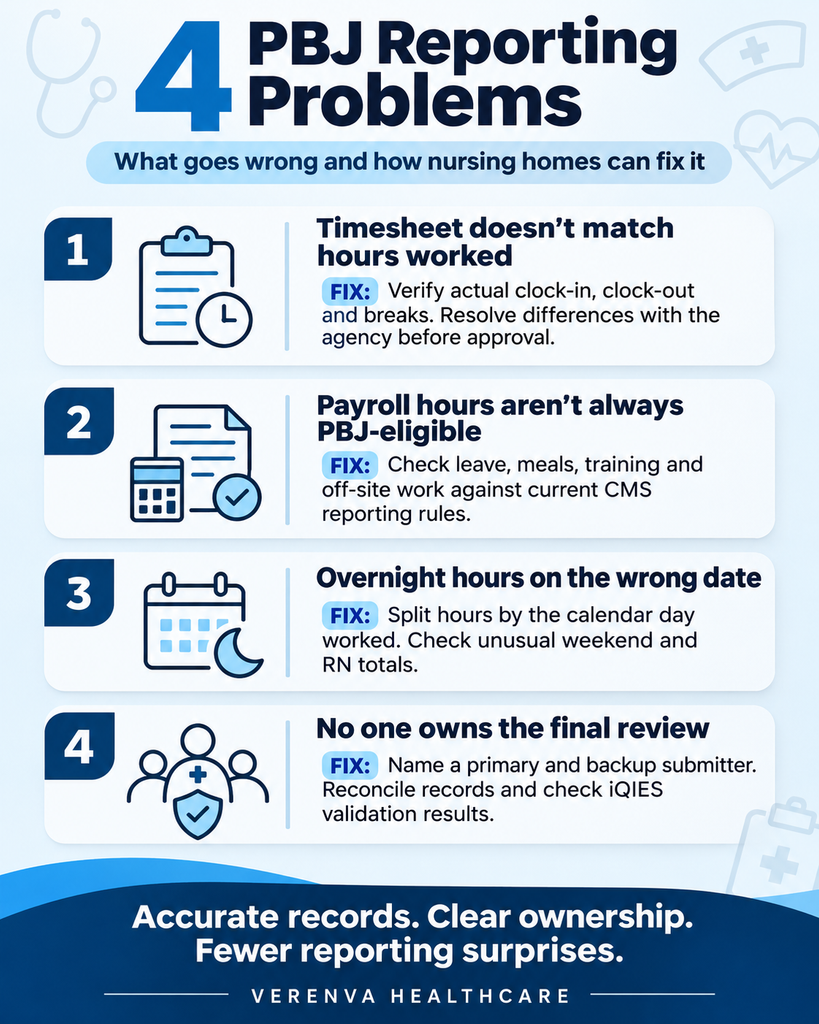
1. The agency timesheet does not match the hours worked.
What to do: Have the charge nurse or designated reviewer check the clinician’s arrival, departure, and break times before approving the shift. Payroll or the PBJ coordinator should resolve differences with the agency and keep the corrected record.
2. Payroll hours are mistaken for PBJ-eligible hours.
What to do: Review paid leave, meal breaks, training, and off-site work against the current CMS rules. The reporting team should calculate eligible hours, not simply copy the payroll total. Document why any hours were excluded or adjusted.
3. Overnight shifts are reported on the wrong date.
What to do: Split overnight hours between the calendar dates when they were actually worked. Check days with unusually low RN or weekend hours and investigate before submission.
4. No one owns the final review.
What to do: Assign a primary and backup PBJ submitter. Have payroll or HR reconcile the hours, nursing leadership clarify coverage questions, and the administrator confirm that the review is completed. After uploading, the submitter should check iQIES validation results and correct any errors.
There’s a reason to build these checks into the routine.
A June 2026 HHS Office of Inspector General audit estimated that 5% of RN hours in its March 2024 sampling frame lacked adequate supporting records.
That does not necessarily mean the nurses never worked those hours. It means the records did not adequately support what was reported.
See the HHS OIG audit.
Why Weekend Hours Deserve a Second Look
A facility can cover its weekend shifts and still raise questions if its PBJ data does not show the coverage accurately.
A 2024 survey at Iron River Care Center in Michigan shows why this matters. PBJ data flagged unusually low weekend staffing on 26 dates, and surveyors cited the facility for incomplete or inaccurate reporting.
Staff said the system-generated data had not been reviewed. Those flags did not, by themselves, establish that the facility lacked staff on those days.
For your next submission, check unusual weekend figures against actual attendance records while the details are still easy to verify.
Don’t Let Access Problems Become Reporting Problems
CMS moved PBJ submission to iQIES on August 17, 2026.
An accurate report still misses its deadline if nobody can access the system.
CMS revokes iQIES roles after more than 60 days without a login. Assign a primary submitter and a backup.
Have both sign in each month, so expired access does not derail submission.
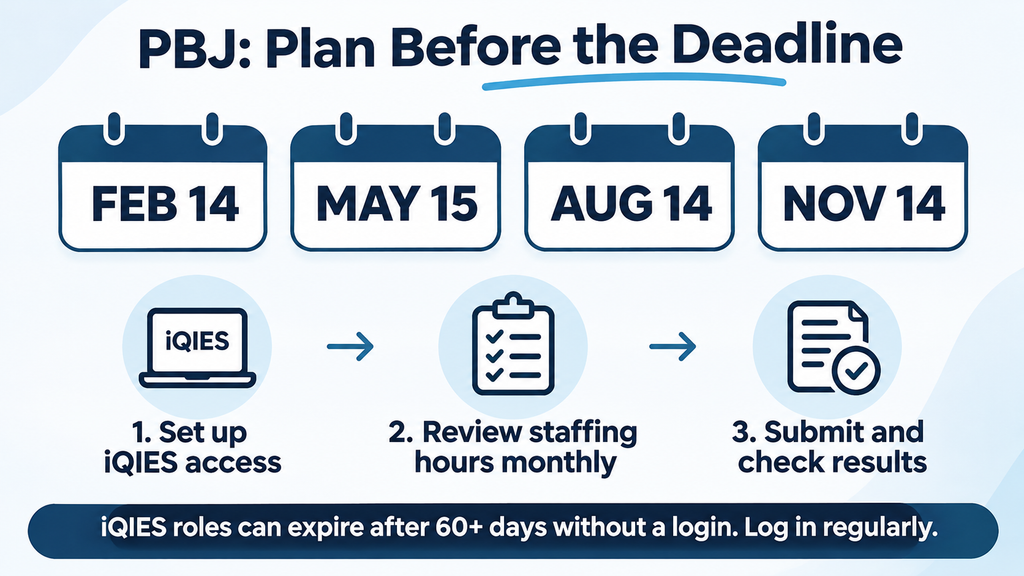
Reconcile payroll and agency hours monthly. Resolve missing punches and adjustments before the last week.
After submission, check the system’s results and fix any errors that require action.
For 2027, PBJ deadlines are February 14 (Sunday), May 15 (Saturday), August 14 (Saturday), and November 14 (Sunday), all by 11:59 p.m. Eastern Time. All four dates fall on weekends.
CMS confirmed in September 2026 that moving PBJ submissions to iQIES did not change these deadlines.
There is no automatic Monday extension. Set an earlier internal deadline: the iQIES Final File Validation Report may take up to 24 hours, and CMS does not accept late submissions.
Build the Habit: A 30-Minute Monthly PBJ Review
Bring the DON or ADON, payroll or HR, and the person coordinating the agency shifts together each month.
Have the PBJ owner reconcile and document the numbers and have the nursing leadership flag unusual coverage or shift details.
This is a shared check, not another report the DON must prepare alone.
Check five things:
- Agency hours: Do approved timesheets match actual clock-in and clock-out records?
- Eligible hours: Did you exclude time that does not qualify for PBJ?
- Weekends: Do the reported hours reflect the weekend coverage your team provided?
- RN coverage: Do the records show any gaps that need investigation?
- System access: Can the primary and backup submitters both log in to iQIES?
Record what changed, why it changed, and who approved it. That gives your team a clear trail if someone asks later.
Where VHive Helps: Agency Records You Can Check
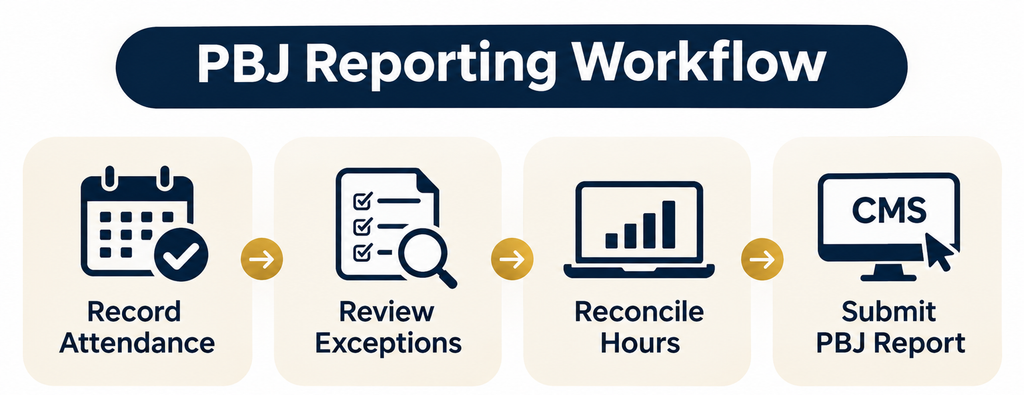
A facility may track agency shifts in one schedule, approve timesheets in another place, and reconcile invoices later. When the numbers differ, finding the right record can take time.
VHive helps Verenva Healthcare track clinician attendance and shift records.
Clinicians clock in and out through the mobile app, and geofencing checks their location. The system uses those attendance logs to create timesheets for facility review.
For the agency hours your facility needs to verify, VHive can help the team:
• Compare recorded arrival and departure times with scheduled shifts.
• Flag clock-in or clock-out differences over 15 minutes for review.
• Route timesheets for facility approval and record adjustments.
• Trace changes through activity logs when a record needs a second look.
That gives the DON and payroll team a starting point when they compare agency hours with facility time clocks, payroll records, and invoices.
Resolve differences before the final PBJ submission.
VHive supports CSV and PDF financial exports, but its documented features do not establish a CMS-ready PBJ file.
Confirm the available shift-level exports with Verenva Healthcare. Your nursing home remains responsible for validating and submitting the final PBJ data.
The Bottom Line: Records You Can Stand Behind
PBJ reporting is more than a quarterly upload. The reliable records behind it help a nursing home understand coverage, reconcile labor expenses, and represent its staffing performance accurately.
The challenge is not only fixing errors. It is preventing the same errors from repeating.
Give the DON visibility into coverage, assign payroll and PBJ responsibilities, and reconcile agency hours throughout the quarter.
Ask your staffing agency for accurate, reviewable records. When administrators, finance teams, or state surveyors have questions, your DON should not have to reconstruct each shift from memory.
The facility needs reliable information and a process everyone can stand behind.
Still chasing agency timesheets before every PBJ deadline?
Verenva Healthcare can show you how VHive tracks attendance, supports facility timesheet approvals, and documents corrections, so your team has clearer agency-hour records to review.
Talk to Verenva Healthcare about your facility’s staffing needs.
